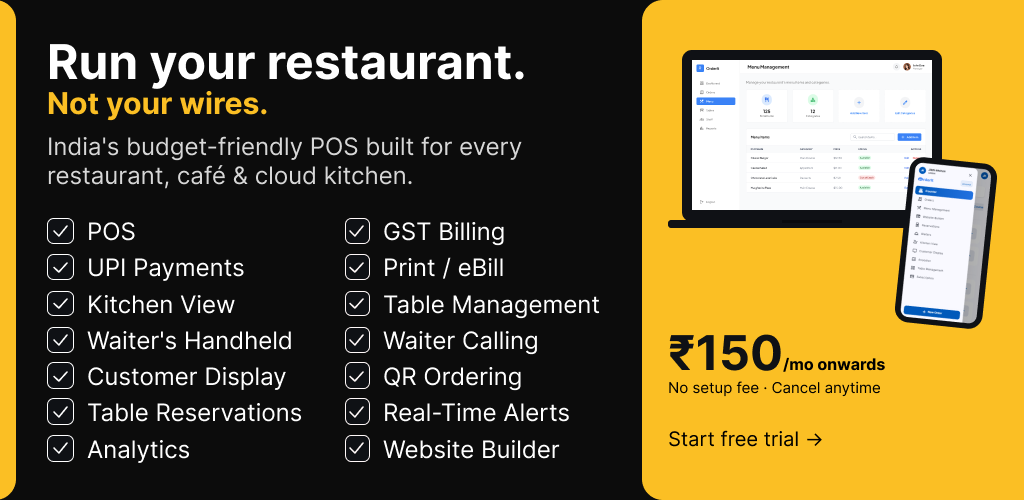
If you are reading this, chances are you have been using Petpooja — or you are evaluating it — and something does not feel right. Maybe the monthly bill keeps climbing with add-on charges. Maybe the KDS module you expected to be included costs extra. Or maybe you simply want a restaurant POS software in India that does more without the constant upselling.
You are not alone. Thousands of restaurant owners across Mumbai, Delhi, Bangalore, Pune, and Hyderabad are actively searching for a Petpooja alternative that offers transparent pricing, modern features like QR code ordering, and support that actually responds the same day. The Indian restaurant tech landscape has changed dramatically in 2026, and sticking with a legacy system out of habit can cost you lakhs in lost efficiency every year.
In this guide, we compare the 10 best Petpooja alternatives in India for 2026 — with honest pricing breakdowns, real feature comparisons, and a clear verdict on which one deserves your money. No affiliate deals influencing our rankings. Just what works.
[Image suggestion: Hero banner showing a busy Indian restaurant kitchen with a modern POS tablet in the foreground | ALT: “Restaurant owner using a modern POS system as a Petpooja alternative in an Indian restaurant”]
Why Are Restaurant Owners Looking for Petpooja Alternatives in 2026?
Petpooja has been a prominent name in Indian restaurant management software for years. But prominence does not equal perfection. Here is why an increasing number of restaurant owners are searching for a Petpooja alternative for restaurants in 2026.
Hidden Pricing That Adds Up Fast
Petpooja advertises starting plans that look affordable. But once you add KDS access, QR ordering, online ordering integrations, and multi-branch management, the real cost lands between ₹5,000 and ₹12,000 per month. That is a significant gap between the sticker price and the actual bill — and most owners only discover it after signing up.
Annual Lock-In Contracts
Most Petpooja plans require annual commitments. If the software does not fit your workflow three months in, you are still paying for the remaining nine. For small restaurants and cafes testing the waters with restaurant billing software, that lock-in is a serious risk.
Extra Charges for Essential Features
Features like Kitchen Display Systems, QR code menus, and advanced analytics — things that should be standard in 2026 — are paywalled behind higher tiers or add-on fees. You end up paying a premium for functionality that newer competitors include by default.
Slow Support Response Times
Multiple restaurant owners on forums like G2 and SoftwareSuggest report support response times of 24 to 48 hours. When your billing system goes down during a Friday dinner rush, waiting two days for a reply is not an option.
Transaction Fee Overhead
Petpooja charges 1.5% to 2% transaction fees on online orders processed through its platform. For restaurants doing ₹3–5 lakhs in monthly online revenue, that is ₹4,500–₹10,000 disappearing in fees — on top of the subscription cost.
Slow Innovation Cycle
The cloud-based POS market is moving fast. AI-powered analytics, real-time peak-hour heatmaps, geofenced delivery management — these are no longer luxuries. Petpooja’s feature updates have been incremental rather than transformative, leaving early adopters looking elsewhere.
Interface Complexity for Small Outlets
If you run a single-location cafe or a small dhaba, Petpooja’s interface can feel cluttered and over-engineered. Not every restaurant needs enterprise-grade complexity. Sometimes you just need a POS built for small businesses that gets out of your way.
Key Takeaway: The ideal Petpooja alternative should offer transparent pricing, no lock-in contracts, built-in KDS and QR ordering, fast support, and low or zero transaction fees. Keep these criteria in mind as we review each option below.
Top 10 Best Petpooja Alternatives in India (2026)
We evaluated each alternative across five dimensions: pricing transparency, feature completeness, ease of setup, support quality, and scalability for Indian restaurants. Here is our honest breakdown.
1. OrderIt — Best Overall Petpooja Alternative
Website: orderitnow.in Best For: Dine-in restaurants, cafes, cloud kitchens, QSRs, multi-branch chains Setup Time: 18 minutes average Restaurants Using It: 2,400+
OrderIt is the standout Petpooja alternative in India for 2026, and it earns the top spot for a specific reason: it bundles everything Petpooja charges extra for into a single, transparent plan — without annual lock-ins.
What makes OrderIt different from Petpooja?
The core difference is philosophy. Petpooja was built in an era when POS meant a billing terminal. OrderIt was designed ground-up for modern restaurant operations — where QR code ordering, kitchen display systems, delivery fleet management, and customer-facing displays are not add-ons but essentials.
QR Code Ordering is where OrderIt truly shines. Customers scan a QR code at their table — no app download required — and can browse the menu, place orders, and even call their waiter directly from their phone. The real revenue impact of QR code ordering is well-documented: restaurants report 15–25% higher average order values because customers browse the full menu without feeling rushed.
The Kitchen Display System (KDS) works on any Android TV, which means you do not need to buy proprietary hardware. Just mount a ₹12,000 Android TV in your kitchen, connect it to OrderIt, and your kitchen staff gets real-time order tickets with automatic prioritization. Compare this to Petpooja, where KDS is an add-on module. You can explore more about how KDS software transforms busy kitchens.
Waiter Handheld Ordering supports unlimited waiter accounts on any Android phone — no special hardware needed. Your waiters take orders tableside, the kitchen sees them instantly on the KDS, and the billing desk has everything synced in real time.
Table Management includes an industry-first Super Privacy Mode with location-verified ordering and session locks. This prevents order fraud — a growing concern in high-volume restaurants — by ensuring orders can only be placed by verified devices at verified tables.
Delivery Management comes with built-in geofencing, own-rider tracking, and zero dependency on aggregator platforms. If you want to run your own delivery fleet without paying Swiggy or Zomato commissions, OrderIt makes that operationally simple. Check out delivery management tools for restaurant fleets for a deeper comparison.
Other features include GST-compliant billing with automatic CGST/SGST split, real-time analytics with peak-hour heatmaps, a Customer Display System, multi-branch management from one dashboard, a built-in website builder with Google indexing and online reservations, stock management with real-time QR menu sync, and UPI/card payments via Cashfree with no hidden platform charges.
Pricing: Transparent tiers listed on orderitnow.in/pricing. No annual lock-in. No hidden add-on fees.
Pros:
- All-in-one platform — KDS, QR ordering, delivery management included
- 18-minute setup, no technical expertise required
- Unlimited waiter accounts on any Android phone
- Zero transaction fees on orders
- Real-time analytics with KPIs every restaurant owner should track
- GST-compliant with thermal printing support
Cons:
- Relatively newer brand compared to legacy players
- Best suited for Android-first setups (iOS app roadmap in progress)
[Image suggestion: OrderIt dashboard on a tablet showing the KDS and table management view | ALT: “OrderIt restaurant POS dashboard showing kitchen display system and table management”]
2. POSist (Restroworks) — Best for Enterprise Chains
Website: posist.com Best For: Large restaurant chains, hotel F&B outlets
POSist, now rebranded as Restroworks, targets enterprise-level restaurant operations. It offers a comprehensive cloud-based POS with CRM, loyalty programs, and multi-location management. The platform integrates well with Swiggy and Zomato for aggregator order management.
However, POSist is built for scale, and its pricing reflects that. Small and mid-size restaurants often find the cost prohibitive, with plans reportedly starting above ₹8,000/month for meaningful functionality. The onboarding process is also significantly longer than newer alternatives.
Pros:
- Strong enterprise feature set
- Robust aggregator integrations
- Good CRM and loyalty tools
Cons:
- Expensive for small restaurants
- Complex setup and onboarding
- Support can be slow for non-enterprise clients
3. LimeTray — Best for Online Ordering Focus
Website: limetray.com Best For: Restaurants focused heavily on online ordering and marketing
LimeTray positions itself as a marketing-first restaurant management platform. Its strength lies in online ordering websites, customer engagement tools, and social media integrations. If your primary goal is building a direct online ordering channel to reduce Zomato/Swiggy commissions, LimeTray has a decent toolkit.
The weakness is in dine-in operations. LimeTray’s in-restaurant POS and KDS capabilities lag behind purpose-built alternatives. For restaurants that need strong restaurant management software covering both dine-in and delivery, LimeTray alone may not be enough.
Pros:
- Strong online ordering and marketing tools
- Good website builder with SEO features
- Decent customer data analytics
Cons:
- Weak dine-in POS functionality
- KDS is basic compared to competitors
- Limited table management features
4. GoFrugal POS — Best for Inventory-Heavy Restaurants
Website: gofrugal.com Best For: Restaurants with complex inventory and supply chain needs
GoFrugal started as an ERP solution and expanded into restaurant POS. This heritage shows — its inventory management, purchase order tracking, and supply chain features are among the best in the Indian market. If you run a multi-cuisine restaurant with 200+ SKUs and need granular stock control, GoFrugal handles that well.
The trade-off is the front-of-house experience. GoFrugal’s customer-facing features — QR ordering, waiter handhelds, delivery management — are not as polished or modern as newer Petpooja competitors built specifically for the 2026 restaurant workflow.
Pros:
- Excellent inventory and supply chain management
- Strong GST and FSSAI compliance features
- Reliable for multi-location operations
Cons:
- Dated interface design
- QR ordering and KDS feel like afterthoughts
- Steeper learning curve for front-of-house staff
5. SlickPOS — Best Budget Option for Small Cafes
Website: slickpos.com Best For: Small cafes, food trucks, single-counter outlets
SlickPOS targets the budget-conscious end of the market. For a small cafe in Pune or a food truck in Bangalore that just needs reliable billing with basic Swiggy/Zomato integration, SlickPOS does the job without overcomplicating things. It is one of the more budget-friendly restaurant POS systems available.
Where it falls short is scalability. If your single cafe grows into three locations, or if you want advanced features like peak-hour heatmaps and geofenced delivery, you will likely outgrow SlickPOS quickly.
Pros:
- Very affordable entry-level pricing
- Simple, clean interface
- Quick setup for basic operations
Cons:
- Limited scalability for multi-branch operations
- No built-in KDS or advanced delivery management
- Basic reporting compared to full-featured alternatives
6. DotPe — Best for UPI-First Ordering
Website: dotpe.in Best For: QSRs and small eateries focused on digital payments
DotPe gained popularity by making QR-based ordering and UPI payments accessible to small eateries. It integrates tightly with Google Pay and UPI flows, making it a decent choice for quick-service restaurants where speed of payment matters most.
The limitation is depth. DotPe works well as a payment and ordering layer but lacks the comprehensive restaurant management features — KDS, waiter handhelds, stock management, multi-branch control — that a true Petpooja alternative needs. It is more of a complementary tool than a complete replacement.
Pros:
- Strong UPI and digital payment integration
- Easy QR code setup
- Works well for high-volume, low-complexity outlets
Cons:
- Not a full POS replacement
- No KDS or advanced kitchen management
- Limited analytics and reporting
7. Torqus — Best for Cloud Kitchen Operators
Website: torqus.com Best For: Cloud kitchens, delivery-only brands
Torqus focuses on cloud kitchen management with multi-brand support, order aggregation from Swiggy/Zomato, and kitchen workflow optimization. If you operate multiple delivery brands out of a single kitchen in Hyderabad or Delhi, Torqus understands that operational model well.
For dine-in restaurants, though, Torqus is not the right fit. Table management, customer-facing displays, and waiter ordering are not core strengths. It is a specialist tool for a specific segment.
Pros:
- Purpose-built for cloud kitchens
- Good multi-brand order management
- Decent aggregator integration
Cons:
- Not suitable for dine-in restaurants
- Limited POS and billing features
- Smaller support team
8. QueueBuster — Best for Quick Service and Retail Hybrid
Website: queuebuster.co Best For: QSRs, bakeries, sweet shops with retail components
QueueBuster straddles the line between retail POS and restaurant POS. This makes it a surprisingly good fit for Indian sweet shops, bakeries, and mithai stores that handle both counter sales and food orders. Its billing is GST-compliant, and the interface is designed for speed at the counter.
The restaurant-specific features — dine-in management, kitchen displays, waiter apps — are not as developed as what you would find in a dedicated restaurant management tool. If you are a pure restaurant, there are better options on this list.
Pros:
- Good hybrid retail + restaurant POS
- Fast counter billing
- Affordable for small businesses
Cons:
- Weak dine-in and table management
- Basic KDS
- Not ideal for full-service restaurants
9. UrbanPiper — Best for Aggregator Integration (Not a Full POS)
Website: urbanpiper.com Best For: Restaurants managing orders across multiple aggregator platforms
UrbanPiper is not technically a POS — it is a middleware platform that centralizes orders from Swiggy, Zomato, and other delivery aggregators into one dashboard. It reduces the chaos of managing multiple tablets and prevents missed orders during peak hours.
The important distinction is that you still need a separate POS for billing, inventory, and in-house operations. UrbanPiper works best as a layer on top of your existing system, not a replacement for Petpooja. Many restaurants pair it with a POS like OrderIt for a complete stack.
Pros:
- Excellent aggregator order consolidation
- Reduces missed orders and errors
- Integrates with most Indian POS systems
Cons:
- Not a standalone POS — still need billing software
- Adds another subscription cost
- Limited use for dine-in-only restaurants
10. Jeebly / BillBoox — Best for Hyper-Local Single Outlets
Website: jeebly.com / billboox.com Best For: Neighbourhood restaurants, single-location eateries
Jeebly (and its billing product BillBoox) targets the hyper-local single-outlet restaurant that needs basic billing, menu management, and GST compliance without any complexity. It is designed for the owner-operator who handles everything personally and needs software that stays simple.
The simplicity is also the ceiling. If you plan to grow — add a second branch, launch delivery, implement KDS — you will need to migrate to a more capable platform eventually.
Pros:
- Very simple to use
- Affordable for micro-restaurants
- Basic GST billing
Cons:
- Extremely limited feature set
- No KDS, QR ordering, or delivery management
- Not scalable beyond a single outlet
[Image suggestion: Grid showing logos of all 10 Petpooja alternatives | ALT: “Logos of the top 10 Petpooja alternatives in India for 2026 including OrderIt, POSist, LimeTray, and more”]
Feature Comparison Table: Petpooja vs Top Alternatives
Here is a side-by-side comparison of the features that matter most to Indian restaurant owners. This should help you evaluate each Petpooja competitor objectively.
| Feature | Petpooja | OrderIt | POSist | LimeTray | GoFrugal | SlickPOS | DotPe |
|---|---|---|---|---|---|---|---|
| QR Code Ordering | Add-on | Included | Add-on | Basic | Basic | No | Yes |
| Kitchen Display System | Add-on | Included (any Android TV) | Included | Basic | Add-on | No | No |
| Waiter Handheld App | Limited devices | Unlimited (any Android) | Yes | No | Limited | No | No |
| Table Management | Yes | Yes + Super Privacy Mode | Yes | Basic | Basic | No | No |
| Delivery Management | Basic | Geofencing + own fleet | Basic | Yes | No | No | Basic |
| GST-Compliant Billing | Yes | Yes (auto CGST/SGST) | Yes | Yes | Yes | Yes | Yes |
| Multi-Branch Dashboard | Add-on | Included | Included | Limited | Yes | No | No |
| Real-Time Analytics | Basic | Peak-hour heatmaps | Yes | Basic | Yes | Basic | Basic |
| Website Builder | No | Yes (Google-indexed) | No | Yes | No | No | Basic |
| Transaction Fees | 1.5–2% | 0% (via Cashfree) | Varies | Varies | N/A | Varies | UPI-based |
| Annual Lock-In | Yes | No | Yes | Varies | Yes | No | No |
| Average Setup Time | Days | 18 minutes | Days | Days | Days | Hours | Hours |
| Thermal Printing | Yes | Yes | Yes | No | Yes | Yes | No |
| Customer Display System | Add-on | Included | Add-on | No | No | No | No |
Pro Tip: When comparing restaurant POS software, always calculate the total cost of ownership — subscription + add-ons + transaction fees + hardware. A ₹2,000/month plan with ₹5,000 in add-ons and 2% transaction fees is more expensive than a ₹5,000/month all-inclusive plan. See our detailed checklist of must-have features in billing software before making a decision.
How to Choose the Right Petpooja Alternative for Your Restaurant
Switching restaurant software is a significant decision. Here is a practical framework for evaluating your options.
1. Map Your Actual Needs
Start by listing the features you use daily versus the ones gathering dust. A cloud kitchen in Delhi has very different needs than a fine-dining restaurant in Mumbai. Do you need dine-in table management? QR ordering? Own-fleet delivery? Multi-branch control? Be specific.
2. Calculate Total Cost of Ownership
Do not compare headline subscription prices. Factor in add-on modules, per-transaction fees, hardware requirements, and implementation costs. A POS that seems cheaper at ₹3,000/month but charges for KDS (₹1,500), QR ordering (₹1,000), and takes 2% on transactions can easily exceed ₹8,000/month in real costs.
3. Test the Setup Process
If a POS takes two weeks to set up with a dedicated “implementation manager,” that is a red flag about ongoing complexity. Modern restaurant management software should be operational within hours, not weeks. OrderIt’s 18-minute average setup time is a benchmark worth comparing against.
4. Verify Support Response Times
Ask each vendor directly: “What is your average support response time?” Then test it. Send a support query during a weekend evening — that is when you will actually need help. The difference between 30-minute and 48-hour response times can mean the difference between a minor hiccup and a lost evening of revenue.
5. Check for Aggregator and Payment Flexibility
If you rely on Swiggy and Zomato, ensure the POS integrates cleanly. If you want to build a direct ordering channel, check whether the platform supports that without steering you back to aggregators. And always verify how the POS handles payments — hidden transaction fees erode margins faster than most owners realize.
6. Plan for Growth
Choose software that handles your next stage, not just your current one. Opening a second location next year? Make sure multi-branch management is included, not a ₹3,000/month add-on. Planning to launch delivery? Verify the delivery management module exists and works.
Why OrderIt Is the Best Petpooja Alternative in 2026
After evaluating dozens of restaurant management platforms for the Indian market, OrderIt consistently stands out as the most complete best Petpooja alternative 2026 for several concrete reasons.
Everything is included, nothing is paywalled. KDS, QR ordering, delivery management, waiter handhelds, customer display, multi-branch dashboard, website builder, analytics — all included in every plan. There is no moment three months in where you discover the feature you need costs extra. This alone sets it apart from Petpooja and most competitors on this list.
Hardware freedom saves lakhs. OrderIt’s KDS runs on any Android TV. Its waiter ordering app runs on any Android phone. Its counter POS works on standard tablets. You are not locked into buying proprietary hardware from the vendor — a practice that adds ₹30,000–₹80,000 in upfront costs with some competitors.
Indian restaurants are the primary design target. OrderIt is built for the specific realities of Indian restaurants — GST with automatic CGST/SGST split, FSSAI compliance workflows, UPI-first payment via Cashfree, thermal bill printing in the formats Indian customers expect, and analytics dashboards focused on KPIs Indian restaurateurs actually track.
The QR ordering experience is best-in-class. No app download for customers. Pre-ordering from home before arriving. Waiter calling directly from the QR menu. Real-time menu sync with stock levels — so customers never order an item that is out of stock. This is not a basic QR-to-PDF-menu link. It is a full digital ordering workflow.
Super Privacy Mode solves a real problem. Table-level location verification and session locks prevent order tampering — a problem that costs Indian restaurants more than most realize. OrderIt is the first platform to address this with a production-ready feature, not just a concept.
Delivery management without aggregator dependency. With built-in geofencing, own-rider tracking, and a direct ordering website with Google indexing, OrderIt lets restaurants build their own delivery channel. No 25–30% Swiggy/Zomato commissions. No loss of customer data. Full control.
2,400+ restaurants already made the switch. This is not a beta product. With restaurants live across multiple Indian cities and an 18-minute average setup time, the operational proof already exists. Read more about why OrderIt stands out as a restaurant management choice.
[Image suggestion: Split screen comparing Petpooja’s cluttered interface with OrderIt’s clean dashboard | ALT: “Side-by-side comparison of Petpooja and OrderIt restaurant POS interfaces”]
Frequently Asked Questions (FAQ)
Is OrderIt better than Petpooja for small restaurants?
For small restaurants and cafes, OrderIt offers a significant advantage over Petpooja because all features are included without add-on charges. A single-location cafe does not need to worry about which tier unlocks KDS or QR ordering — everything works from day one. The 18-minute setup and Android-first approach also mean lower hardware costs. If you run a small outlet, check our guide on the best POS software for cafes and coffee shops.
What is the cheapest Petpooja alternative in India?
SlickPOS and BillBoox offer the lowest entry prices in the market. However, the cheapest option is rarely the best value. When you factor in features per rupee — especially KDS, QR ordering, and delivery management — OrderIt offers the strongest ROI because nothing essential requires an upgrade. See our budget POS comparison for a detailed breakdown.
Can I switch from Petpooja to OrderIt without losing my data?
Yes. OrderIt supports menu import and can help migrate your existing setup. The average migration time is under a day, and the support team handles the transition. You do not need to re-enter your menu, tax settings, or table configuration from scratch.
Does OrderIt integrate with Swiggy and Zomato?
OrderIt supports integration with major delivery aggregators. Additionally, its built-in delivery management with geofencing and rider tracking allows you to run your own fleet — reducing or eliminating aggregator commissions entirely.
How does OrderIt handle GST billing?
OrderIt automatically splits tax into CGST and SGST components based on your location and the applicable rates. GST invoices are generated in the government-mandated format, and all transaction data is exportable for filing. Compliance is built into the billing engine, not bolted on as an afterthought.
What hardware do I need for OrderIt?
An Android tablet or phone for the POS, any Android TV for the KDS, and any Android phones for waiter handhelds. Standard Bluetooth or USB thermal printers are supported. There is no proprietary hardware requirement — you can use devices you already own.
Is there a free trial available?
OrderIt offers trial access so you can test the full platform before committing. Visit orderitnow.in/pricing for current trial details and plan information.
How does OrderIt compare to cloud-based POS systems like POSist?
While POSist (Restroworks) targets enterprise chains with higher pricing, OrderIt delivers comparable — and in some areas superior — functionality at a fraction of the cost. Features like Super Privacy Mode, peak-hour heatmaps, and the website builder with Google indexing are not available in POSist. For a broader comparison, read our complete restaurant management software guide for 2026.
Final Verdict
The Indian restaurant technology market in 2026 offers more choices than ever. Petpooja served its purpose for many years, but the pain points — hidden pricing, annual lock-ins, paywalled features, slow support — have pushed restaurant owners to look for something better.
After a thorough comparison of the top 10 Petpooja alternatives in India, OrderIt emerges as the clear winner for most restaurant types. It combines the breadth of an enterprise platform with the simplicity and pricing transparency that small and mid-size restaurants need. QR code ordering, KDS on any Android TV, unlimited waiter handhelds, geofenced delivery management, Super Privacy Mode, GST-compliant billing, real-time analytics — all included, no hidden costs.
Whether you run a single cafe in Pune or a multi-branch chain in Bangalore, the question is not whether you should switch from Petpooja. It is how much you are losing every month by not switching.
Ready to see the difference? Explore OrderIt’s full feature set or check the pricing page to get started. Setup takes 18 minutes. There is no annual lock-in. And your first bill will not have any surprises.